Category: News

  • Hyku 7.0 and 7.1 released!

    Release notes: Hyku v7.0.0 (March 23) and Hyku v7.1.0 (April 7).

    Hyku 7.0 came out on March 23 and 7.1 followed two weeks later, so we’re covering both here. 7.0 is a major platform upgrade with visible improvements to viewing and discovery, and 7.1 adds changes for institutions that run Hyku themselves.

    HykuUP customers have been running Hyku’s Rails 7.2 code since March 10, and they were on 7.0 the day it was published.

    Platform upgrade

    Hyku 7.0 moves to Rails 7.2 and puts Hyku back on Hyrax’s main line of development. Through the 6.x releases Hyku ran on its own branch of Hyrax, so fixes made in Hyrax had to be carried over by hand. Now security fixes and improvements in Hyrax reach Hyku directly, and future upgrades should be smaller.

    Viewing

    The Universal Viewer is now version 4. Keyboard users can tab through a work’s page properly, and search terms still carry from the search results into the viewer.
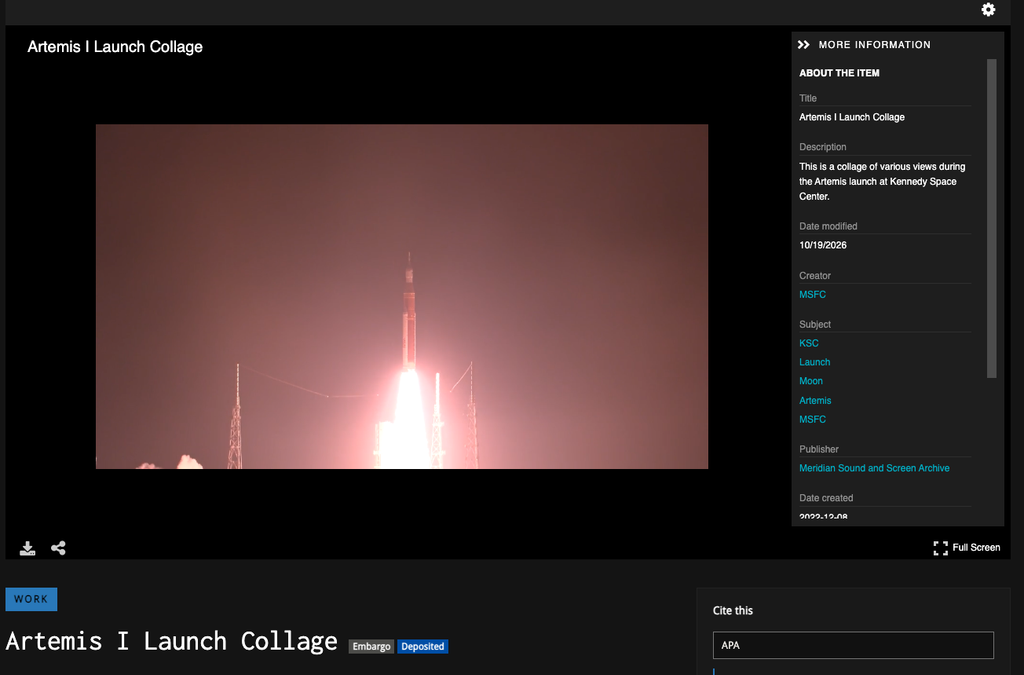
    A screenshot of a video of various views during the Artemis launch at Kennedy Space Center.

    Discovery

    • The sitemap now scales past 50,000 works. The old one couldn’t, and its XML wasn’t valid, so search engines could miss part of a large repository.
    • Works carry more of the fields Google Scholar looks for, which helps articles and theses get indexed correctly. HykuUP has had this since December.
    • Collections are now OAI-PMH sets, so an aggregator can harvest a single collection instead of the whole repository. Each OAI record also links to the work’s page and thumbnail.

    Branding

    • A repository manager can try a color scheme, browse the site with it, and then save it as the repository’s default. One click brings the saved colors back after later experiments.
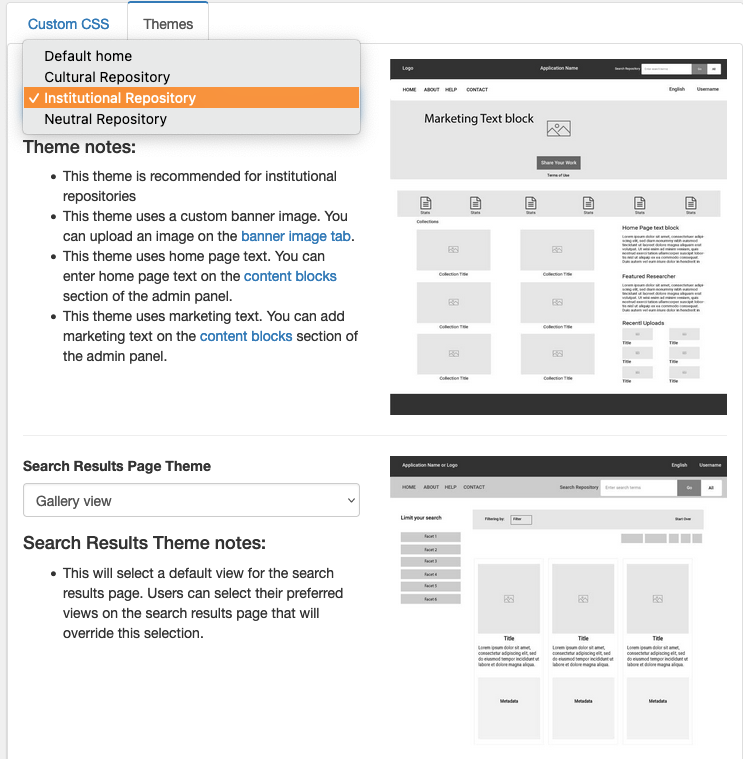
    • The new Community theme lays out collections, featured works, and recent works as cards, puts work metadata in two columns, and adds a citation button with copyable MLA, APA, and Chicago citations.

    Language field

    Depositors can fill in the language field from Library of Congress language lists by typing a language code and picking from the matches. Language values stay consistent across the repository as a result.

    Hyku 7.1

    • Hyku can now run without Fedora, keeping everything in PostgreSQL. For institutions that host Hyku themselves, that’s one less service to run, monitor, and upgrade.
    • Hyku now clears out old temporary upload files on a schedule, so the server’s disk doesn’t slowly fill with leftovers.

    To see 7.0 on a live repository, book a demo.
  • Hyku 6.2 released!

    For the full release notes, see Hyku v6.2.0 on GitHub.

    Hyku 6.2 is the first release with Flexible Metadata, the change we previewed in our Hyku 6.0 post. HykuUP customers were running 6.2 release-candidate code by late September, so the search and full-text changes below reached them about six weeks ahead of the release.

    Flexible Metadata

    Until now, a repository’s fields and work types were defined in code. Adding a field meant a code change and a deployment, and every customization made the next upgrade harder. In 6.2 they come from a metadata profile that each repository keeps for itself.

    • A repository manager who needs a new field, such as a grant number on datasets, adds it to the profile instead of waiting on a developer.
    • The profile also sets which work types a repository offers, so a repository that only collects theses and datasets doesn’t show depositors anything else.
    • Field labels come from the profile, so the deposit form uses the names your staff already use.
    • Hyku checks a profile before accepting it. A profile with a missing required field or an unsupported work type gets an error message on upload instead of breaking the repository, and Hyku won’t let you remove a work type that already has records.

    Controlled vocabularies

    A field can now take its values from a controlled vocabulary named in the profile, either a local list the repository maintains or a remote authority such as the Library of Congress. Depositors pick a term instead of typing one, so the same subject doesn’t end up entered several different ways.

    Search controls

    • Repository managers can leave chosen fields off the search results page, so results show only the fields visitors need to pick the right item.
    • A collection can be hidden from search results without changing who can see it, which suits administrative or in-progress collections.
    • PDFs with no text layer can still be searched in full. Upload a plain-text file alongside the PDF and Hyku searches its text, which helps with scans where OCR failed or a transcript already exists.

    Bot traffic

    Search pages are the ones crawlers scrape hardest, and Hyku 6.2 aims its rate limiting at them. Heavy bot traffic is throttled there, so pages stay fast for people.

    Batch Create retired

    The older Batch Create form, which made several works from one set of metadata, doesn’t work with Hyku’s new storage layer and is switched off in 6.2. Bulk Import covers the same job.

    Questions about Flexible Metadata, or about running Hyku on HykuUP? Book a demo and we’ll show you a profile in action.

    Post details (not part of the post)

    • Title: Hyku 6.2 released!
    • Slug: hyku-6-2-released
    • Date: November 4, 2025
    • Category: News
    • Author: HykuUP Team
    • Excerpt: Hyku 6.2 introduces Flexible Metadata, so each repository sets its own fields, work types, and controlled vocabularies without custom code.

  • Hyku 6.1 released!

    Most of this release is practical. These are changes repository staff notice the first time they upload a large file, run an import, or search the collection.

    Large file uploads

    Large files now upload in pieces, through the deposit form and through Bulk Import. A 4 GB video no longer times out halfway through and has to start over, which matters most to anyone depositing video or high-resolution scans.

    Bulk Import updates

    • Each repository can keep its own Bulk Import field mappings. In a shared Hyku, one library’s spreadsheets can use their own column names or a different identifier column without affecting anyone else’s.
    • The import status page loads faster on large imports, so repository managers can check on a big run without waiting on the page.

    Search inside PDFs

    • Full-text search now reaches inside born-digital PDFs, the kind saved from a word processor rather than scanned. Results for both born-digital and scanned PDFs show a snippet with the matching text, so a visitor sees the passage before opening anything.
    • Search terms carry through from the results into the viewer, so a researcher who clicks a result can pick up the same search inside the document.

    Branding

    • Repository managers have more control over color, including the primary button, so the site can follow campus brand standards.
    • Themes can carry their own default colors, and one click puts a theme’s colors back after you’ve experimented.
    • A styling pass brought the dashboard, home page, collection pages, and search results in line with each other.

    Willow SWORD API updates

    Hyku accepts deposits from other systems over SWORD through the Willow SWORD API. This release brings a set of fixes and improvements for the people who build and run those integrations:

    • The service document responds faster and no longer times out, and it now lists the admin sets the depositing account can use, so an integration knows where it is allowed to deposit.
    • A deposit can name the admin set it belongs in.
    • Works and file sets come back with fuller metadata.
    • A deposit that doesn’t specify visibility is saved as private instead of failing.

    Google Analytics 4

    Repositories can now report visitor statistics to Google Analytics 4. Google stopped processing data in the older Universal Analytics in July 2023, so this is what keeps a repository’s usage numbers coming in.

    Under the hood

    For institutions that run Hyku themselves:

    • Background work such as imports and file processing now runs on a job queue stored in PostgreSQL by default instead of Redis, which makes queued jobs easier to inspect and recover after a restart.
    • Files can be stored in Amazon S3.

    Questions about 6.1, or about running Hyku on HykuUP? Book a demo and we’ll walk you through it.

  • HykuUP Roadmap: Hyku 6.0 released and other major features upcoming!

    Hello Hyku Community!

    We have a (very) late announcement, and some timely updates!

    Through partnership with PALNI / PALCI (Hyku for Consortia) and Adventist Digital Library, and with support and collaboration from the Samvera Foundation, Notch8 is happy to announce the release of Hyku 6.0 on HykuUP, and available for access and use on Hyku Github!

    Hyku 6 was a huge release.  Among many improvements, here are the biggest areas of added value:

    1. Valkyrie: This modernized data mapper replaces ActiveFedora, allowing Hyrax and Hyku implementations to choose their own storage backends, going beyond Fedora 4 or 5, and enabling users to use various backends, such as Fedora, PostgreSQL, Solr, and even local disk. This allows for greater choice in storage solutions and potentially better performance or cost-effectiveness.
    2. Hyrax 5 upgrade: Hyku runs on Hyrax 5, so Hyku is now using Hyku 5.x and all the features and benefits that come with it!  (Hyrax5 Release announcement) (Hyrax 5 release notes)
    3. Knapsack: To understand Knapsack, it’s necessary to understand the problems it solves, and value it provides to Hyku users, especially in contrast with other Hyrax-based repository solutions – this deserves it’s own blog post.  Knapsack is a game-changer.  This is a wrapper on Hyku that eases upgrades (a source of pain for a lot of institutions using Hyku with some customizations) by providing a clear place for customizations, overrides, themes, and deployment scripts.  (To foreshadow the benefits, we’ve already heard positive feedback from the community after upgrading to 6.1)

    Now for some updates – Hyku 6.1 and 6.2 are coming very soon.

    Hyku 6.1 is an iterative release containing a number of bugfixes, UI improvements, bulkrax updates.  One more notable update is the full support for Google Analytics 4.

    Hyku 6.2 will mark the official release of Flexible Metadata (Background on Julie Allinson and the Allinson Flex project) to the Hyku community (shoutout to Indiana University).  This gem allows for the configuration of custom metadata using a YAML file with M3 schema.  Previously, such custom configurations were complex to implement, and necessitated developer support, and made subsequent Hyku upgrades more challenging.  This feature largely addresses these issues, and tees up the platform for seamlessly-supporting authority-controlled vocabularies, and generally easier maintainability moving forward.

    Here at Notch8, we’re excited to continue to support and build the Hyku product, and are excited to share these benefits with the Samvera Foundation community!

  • HykuUP-grade: Now on Hyku 5.0!

    HykuUP was upgraded to Hyku 5.0 in summer of 2023! This means we’re now on the best-supported software version, but also that we have a host of new features available for our clients.

    Theming & UI

    Featured Collection

    The previous default Hyku homepage already had sections in which Works, Recent Works, or specific Researchers could be highlighted – all of which an admin can disable in the UI if they prefer these features not appear. Now, the ability to highlight specific Collections has been added.

    “Explore Collections” highlights collections with a list the repository administrator has curated.

    Favicon for Enhanced Branding

    HykuUP now offers subscribers more robust theming options in the Appearance tab. In addition to the existing ability to upload a homepage logo and banner image, change fonts and colors, and do more thorough updates with a CSS style sheet, HykuUP now allows you to upload a favicon, so that you can customize the small logo image that appears in the browser tab.

    Additional Layout Templates

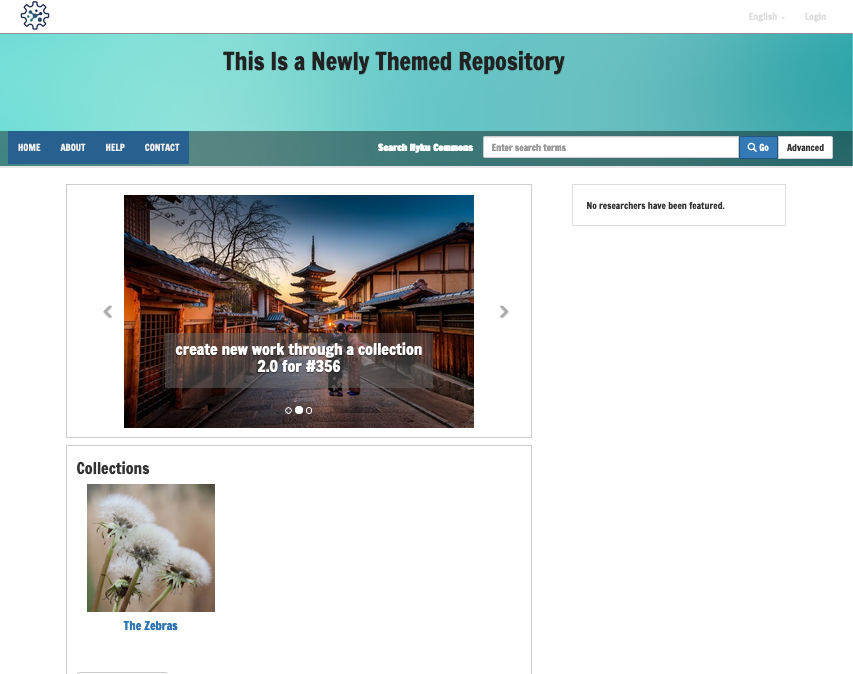
    Repository administrators now have the ability to change the layout of their homepage, work show page, and search result page to provide a user experience that brings different elements to the fore. There are four different options, which are easy to select from the admin dashboard.

    Admin UI for selecting the page layouts.
    One of the new theming layouts has been applied. This one includes a carousel of highlighted images.

    Groups with Roles

    HykuUP now has enhanced ability to create user groups and assign different permissions levels or workflow roles to those groups, including:

    • Admin
    • Collection Editor
    • Collection Manager
    • Collection Reader
    • User Manager
    • User Reader
    • Work Editor
    • Work Depositor
  • Mediated Deposit in Hyku

    Hyku offers a mediated deposit workflow out of the box. Bringing in the feature from Hyrax, it allows repository managers to control repository content by requiring submission to a mediated workflow that requires all uploads to be reviewed and approved by the admin. This feature can be a great time-saver for program staff.

    This simple deposit workflow is a huge gain for institutions that are relying on manual submission and review via email attachments and other cumbersome processes. It reduces the workload of repository managers and admins by allowing users to self submit through a reviewed process.

    The steps are simple:

    1. The Admin creates a mediated admin set and make that available to the relevant set of Depositors
    2. The Admin receives a notification that a work is deposited and awaiting review
    3. The Admin reviews the submission, with options to approve or push back for revision
    4. If revision is requested, the Depositor receives a notification and Admin comments in the interface, with an opportunity to edit and resubmit
    5. The Admin receives a notification to review the second round, complete with Depositor comments
    6. The Admin approves the work, and it becomes viewable in the repository
    7. The Depositor receives a final notification of success!

    Throughout the process, the work page draft is tagged with a clear label indicating its status. The videos below demonstrate the simplicity and effectiveness of this mediated deposit workflow:

    https://www.youtube.com/watch?v=CHcgYdAykkQ
    https://www.youtube.com/watch?v=aVpwF1DjefA

    While there are many use cases, this feature is especially valuable for academic institutions that preserve electronic theses and dissertations (ETDs). Making ETD’s discoverable and available for researchers is a boon for academic work in the digital age. Mediated deposit offers a built-in solution to a major hurdle in the success of an ETD platform.

    HykuUP makes this easily-configured workflow available to all admin users. It offers a quick-start, feature-rich repository platform for a wide variety of use cases, as well as data migration support for moving from an existing platform. If you have any questions or would like a demonstration, contact us – we’d love to hear from you.

  • Bulkrax: Bulk Import and Export for Hyku

    Importing and exporting records in bulk is a common requirement and one for which there is no single community solution. Use cases are varied, from importing from mass digitization projects, to migrating systems, to editing metadata for re-import.

    Bulkrax is now included in HykuUP. It includes out-of-the-box support for OAI-PMH, CSV, Bagit, and XML import. It’s repeatable and extensible, allowing the addition of new importers to the application. Bulk export is also on the very near horizon.

    How it Works

    Once you have Bulkrax installed, you will have access to an easy to use interface with which you are able to create, edit, delete, run, and re-run imports. Imports can be scheduled to run once or on a daily, monthly or yearly interval. These features are available to admins via the Importers tab on the dashboard.


    View List of Importers:From the admin dashboard, select the “Importers” tab. You will see a list of previously created importers with details of last run, next run, number of records enqueued and processed, failures, deleted upstream records, and total records. From this page you can create a new importer, edit an importer or delete an importer.

    Create an Importer:To create a new importer, select the “New” button on the Importers page and complete the form. Name and Administrative set are required. When you select a parser, you will see a set of specific fields to complete.

    Edit an Importer:To edit an importer, select the edit icon (pencil) and complete the form. Name and Administrative set are required. When you select a parser, you will see a set of specific fields to complete.

    Delete an Importer: To delete an importer, select the delete (x) icon.

  • Multi-Tenancy in Hyku

    Multi-tenancy is a key feature in Hyku, one of the enhancements on base Hyrax. Many potential adopters might not fully understand what multi-tenancy brings to the table or how it is achieved. Rob Kaufman, Senior Partner at Notch8, spoke on the topic at Virtual Connect 2019. His presentation, which serves as the basis for the following, can be found here.

    What is Multi-Tenancy?

    Multi-tenancy provides the ability to stand up multiple discrete digital repositories within one instance of an application – a functionality currently built into Hyku. There is one code base and one set of application instances implemented, but it allows for many data sets and many unique user interface portals, each with a different theme and branding. These discrete repositories have their own permissions, allowing for their own individual users. An example of this in practice is a Hyku instance for a library consortium, inside which several member libraries have their own branded repository with collections available only to their users.

    The Apartment Gem

    Hyku is built on Hyrax, and in utilizing the multi-tenancy feature, each tenant acts like an individual instance of Hyrax. This functionality is powered by the Apartment Gem, a ruby gem incorporated into Hyku. The Apartment Gem allows different subdomains to be different tenants, isolating the data so that there is no cross-contamination between them.

    The Apartment Gem provides several functions that are essential to realize multi-tenancy. It has the ability to take a request and figure out which tenant to load via Rack Middleware. It is also programmed to connect to a given tenant, providing commands to switch between tenants. Helpers and ActiveRecord extensions are employed to allow maintenance of tenants and isolates/protects them from each other. Finally, it provides the ability to create non-tenant tables, allowing for data to be available across all tenants.

    The Apartment Gem powers multi-tenancy in Hyku by interacting with the essential building blocks of the application. On the back-end, Postgres uses schemas that allow multiple data sets within a single data structure, which facilitates faster switching and better performance (Mysql and Sqlite create different databases per tenant). It integrates with Fedora, Redis, and Solr by changing the connection url for every tenant, which means no shared data across tenants. Different Fedora instances can be used to split the load without it becoming necessary for those instances to be aware of each other.

    Challenges of Multi-Tenancy

    Multi-tenancy is a powerful feature, but comes with a few challenges. Developers and administrators have to be made decisions on what to isolate versus what to share among tenants. Maintaining backups can be a challenge with multi-tenancy. Administration of various tenants requires individual rules and handling. When upgrades roll out, they are automatically across all tenants. An internal team with enough knowledgeable tech guidance can educate themselves and navigate these challenges. However, for users without those resources, additional developmental support can be helpful. A provider of a Hyku solution bundle like HykuUP can assist in leading an adopter to success.

  • Hyku Load Testing

    As one of the key community contributors to Hyku, Notch8 was grateful for a recent opportunity to perform a load test on the application, solidifying our understanding of its ability to handle multiple concurrent users. In March 2019, we conducted this testing through a project for Carleton University in Ottawa, Canada. Carleton’s intention was to set a baseline for acceptable usage, so the goal was deliberately free-form: hit the system and see what happens.

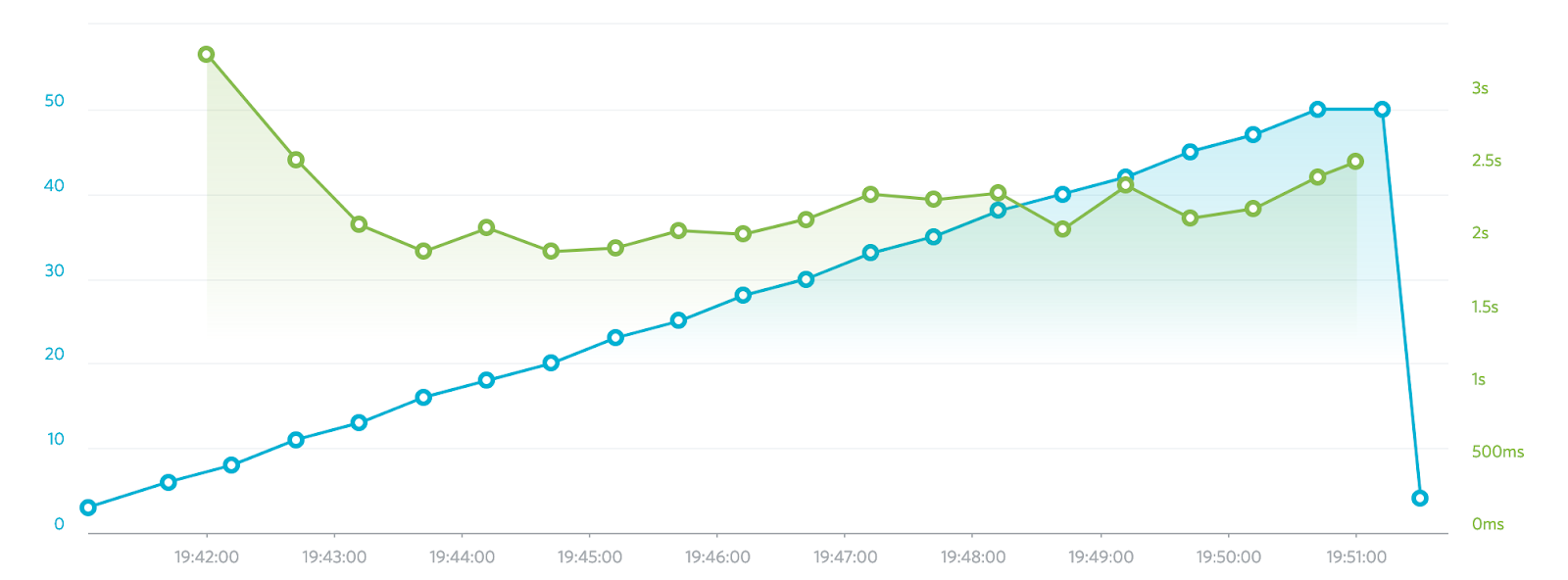
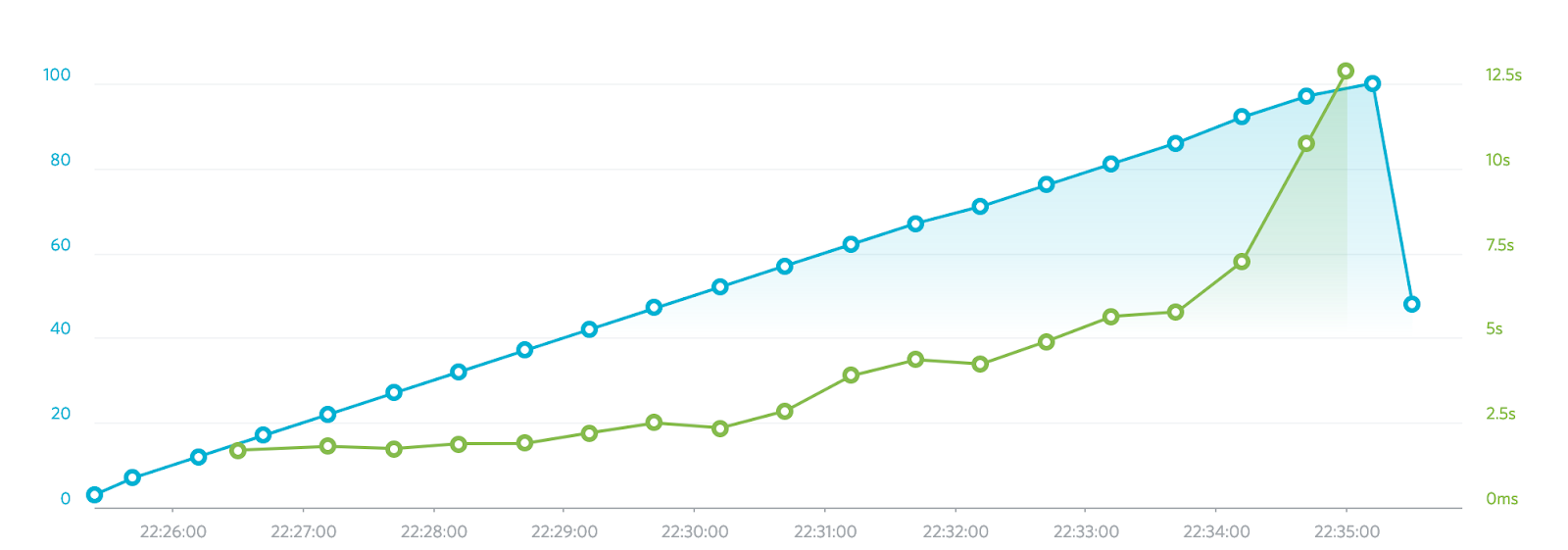
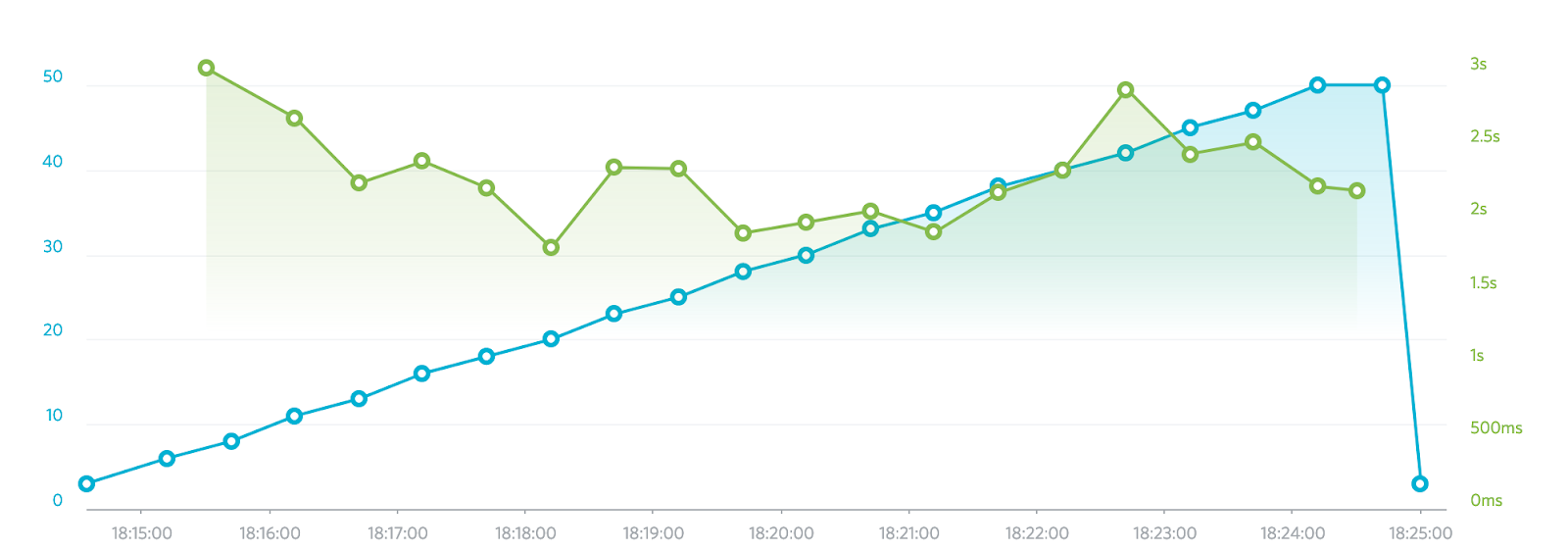
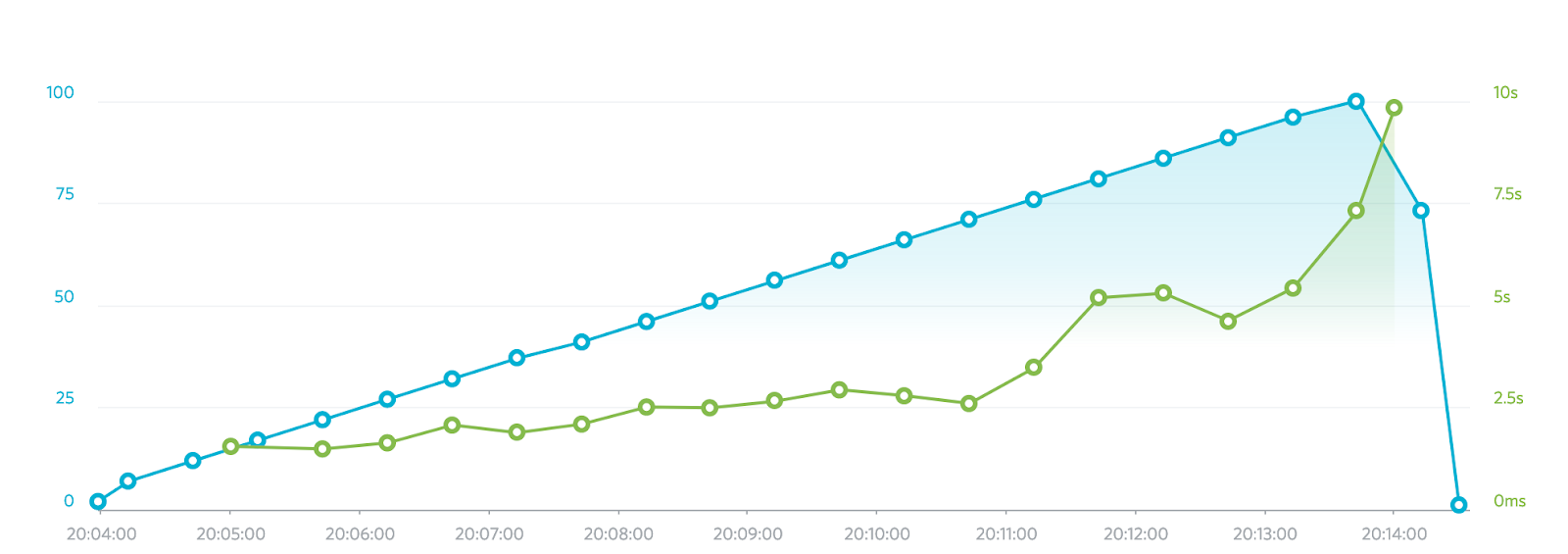
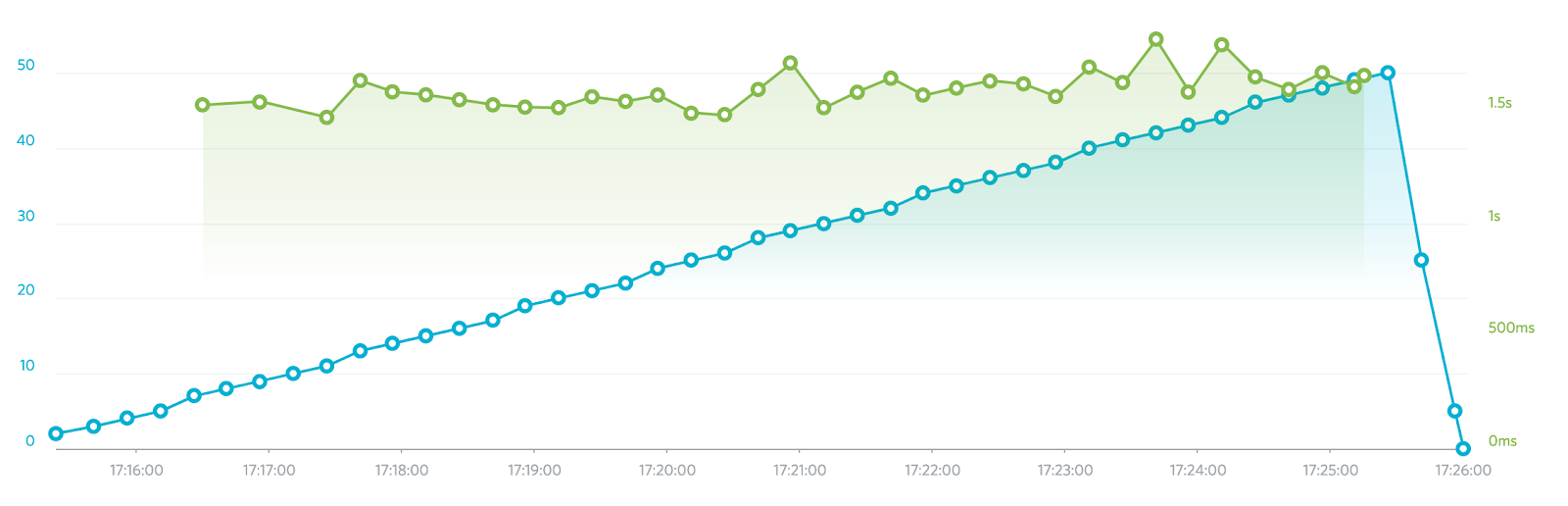
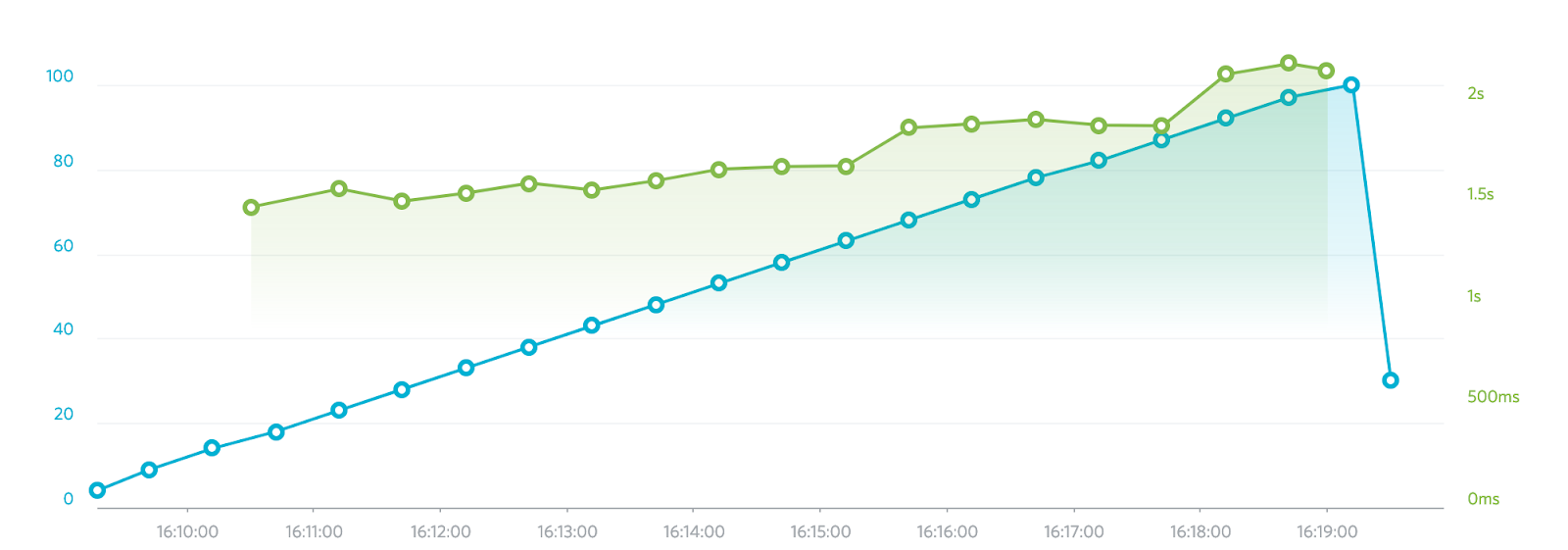
    Given the complexity of a Samvera application, an average response time of 500 milliseconds is considered acceptable, with 300 milliseconds considered exceptionally good. Tests were conducted on three machine sizes: t2.medium, m5.large, and m5.xlarge. All services (Redis, Solr, Postgersql, Fedora and Rails) were run on the same instance for these baseline tests. The graphs below illustrate performance in each size machine, with 50 and 100 concurrent users respectively, reporting the time it took to complete a set script of the following actions:

    • Visit the login page
    • Logging in
    • Visiting the Dashboard Works page
    • Visiting a work in the list
    • Visiting the Dashboard Works page
    • Searching for a work
    • Visiting the Search page (not dashboard)
    • Performing a search for a Work
    • Visiting a work in the results

    Visiting a page entails loading the entire page and all assets on the page (i.e. images, css, javascript, etc.)

    These reports start with 1 user and ramp up to 50 or 100 concurrent users over a ten minute period.

    Results t2.medium – 50 users

    Results t2.medium – 100 users

    Results m5.large – 50 users

    Results m5.large – 100 users

    Results m5.xlarge – 50 users

    Results m5.xlarge – 100 users

    The data per user in the graphs above represents multiple page views, so that the expectation of not exceeding 500 milliseconds per page is met when we consider that activity may be up to tenfold per user here. Load testing is fundamentally imperfect, and these conclusions are drawn on a relatively random amount of activity across those users, but still we are able to conclude that the response time for a single page view comes well within the desired expectations.

    Results indicate that any of the machine sizes are sufficient to support a load of 50 concurrent users, with each test staying in the 3 second range at full test load. Only the largest machine (m5.xlarge), however, was capable of handling 100 concurrent users without an exponential increase in response times, remaining solidly in the 2 second range. Notch8 concluded before beginning this test that it is not advisable to utilize anything smaller than an AWS t2.medium (or equivalent 2 core 4GB RAM) machine, though it’s also reasonable to expect that moving Fedora and Solr to their own machines would increase response time significantly.

    These findings are a win for Hyku. They confirm our confidence in Hyku’s performance, and will help the community partners make accurate system recommendations to adopters.